Pages that jump around while loading cost my clients clicks and sales. In this guide I show how I improve CLS score results on real client sites, from measuring the problem to fixing it in WordPress and WooCommerce.
Most of these fixes are small. However, they only work once you know which element moves and why.
What Cumulative Layout Shift actually measures
Cumulative Layout Shift (CLS) tracks how much visible content moves without the user asking for it. Each unexpected shift gets a score. That score multiplies two numbers: the impact fraction and the distance fraction.
The impact fraction is the share of the viewport touched by the moving element, before and after it moves. Meanwhile, the distance fraction is how far it travelled, relative to the largest viewport side. So a big block that moves a long way scores much worse than a small badge nudging a few pixels.
Shifts are grouped into session windows. A window is a burst of shifts less than one second apart, capped at five seconds in total. Your CLS is the score of the worst window, not the sum of every shift on the page.
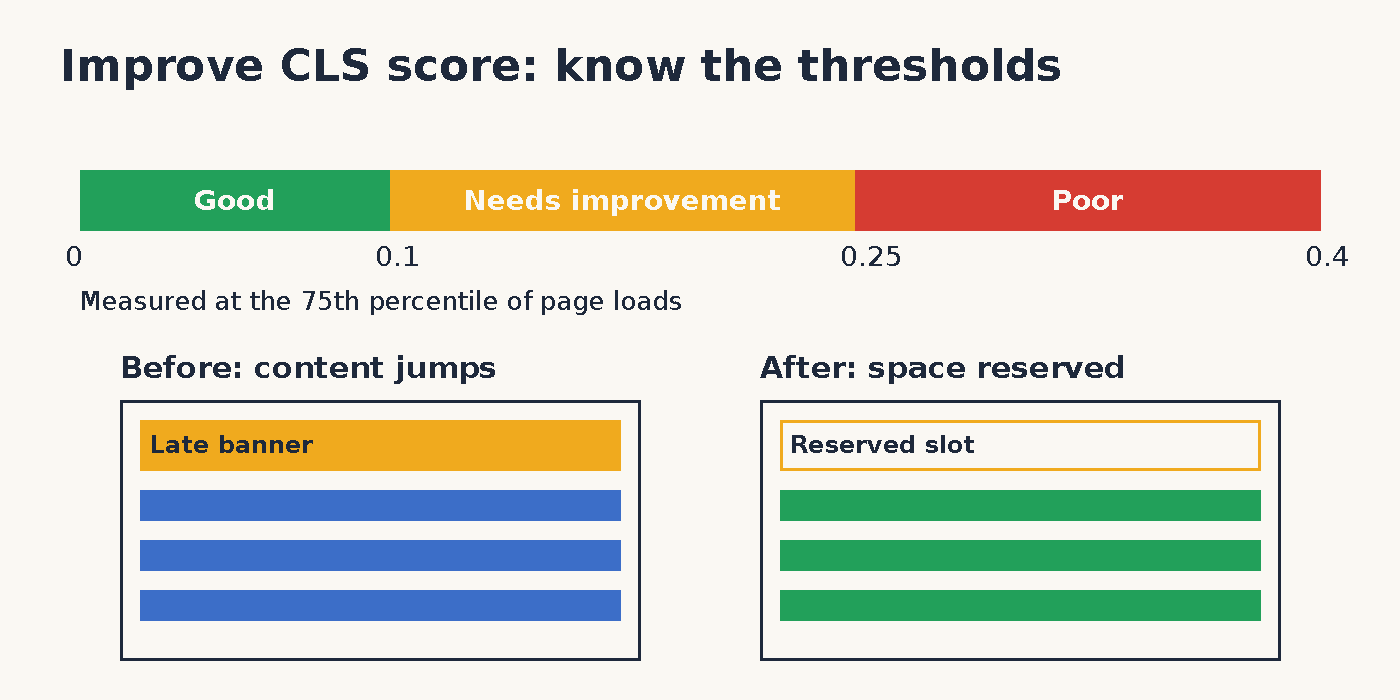
Google treats 0.1 or less as good and anything above 0.25 as poor. Everything in between needs improvement. Importantly, the target applies at the 75th percentile of page loads, split by mobile and desktop.
How I measure layout shift before touching code
First, I separate lab data from field data. Lab tools load the page once in a controlled setup. Field data comes from real visitors, so it also catches shifts caused by scrolling, slow networks and late scripts.
- PageSpeed Insights: shows field data from CrUX at the top and a Lighthouse lab run below it.
- CrUX: the Chrome UX Report holds real user data over a rolling 28 day window, for origins and popular URLs.
- Search Console: its Core Web Vitals report groups similar URLs and flags poor CLS across the whole site.
- Chrome DevTools: the Performance panel has a Layout shifts track. In addition, the Rendering tab can highlight Layout Shift Regions while you browse.
- web-vitals library: Google’s small JavaScript library reports CLS from real sessions to your own analytics.
I usually start in Search Console, then confirm single URLs in PageSpeed Insights. If you need a wider toolkit, I listed my favourites in the SEO tools I use every week. For field tracking, this snippet logs every CLS change with the element that moved:
import {onCLS} from 'web-vitals/attribution';

onCLS((metric) => {
  console.log(metric.value, metric.attribution.largestShiftTarget);
}, {reportAllChanges: true});
How to improve CLS with the classic fixes
Once I know the culprit, the fix is usually one of a handful of patterns. Here is how to improve CLS on almost any stack.
Give images and video a size
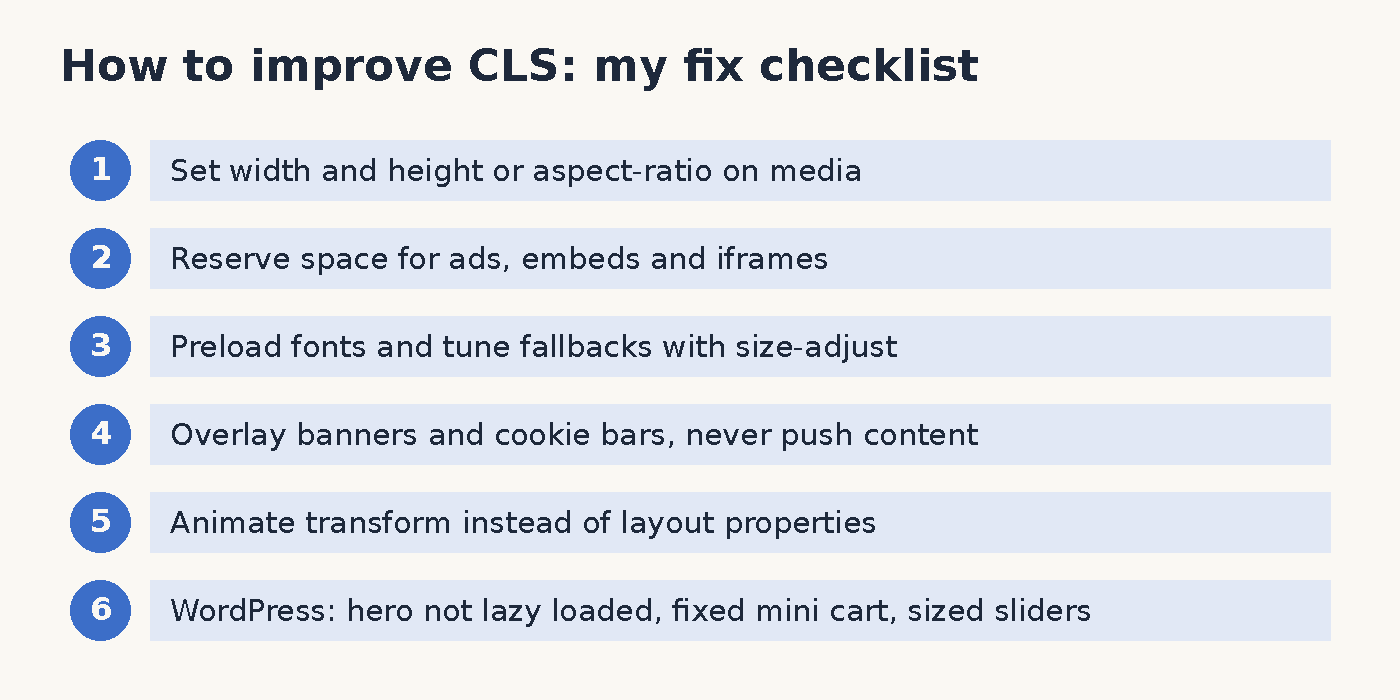
Always set HTML width and height attributes on images and video elements. Modern browsers use them to reserve the right box before the file arrives. Alternatively, set an aspect-ratio in CSS for responsive containers.
.hero-media {
  width: 100%;
  aspect-ratio: 16 / 9;
  object-fit: cover;
}
Reserve space for ads, embeds and iframes
Ads, YouTube embeds, maps and review widgets often load with zero height. Therefore I wrap them in a container with a min-height that matches the most common size. An empty gap looks better than a paragraph that suddenly drops down.
Tame web fonts
Font swaps shift text when the web font has different metrics than the fallback. For this reason, I preload the one or two critical fonts with link rel=preload. Next, I tune the fallback with size-adjust and ascent-override, so the swap barely moves anything.
@font-face {
  font-family: 'Inter Fallback';
  src: local('Arial');
  size-adjust: 107%;
  ascent-override: 90%;
}
body { font-family: 'Inter', 'Inter Fallback', sans-serif; }
The exact percentages depend on your font, so measure them rather than copying mine. Also, keep font-display consistent with your goals. Swap shows text fast, but it needs a matched fallback to stay stable.
Stop banners from pushing content
Cookie bars, promo strips and newsletter boxes that appear above content are frequent offenders. Instead, I overlay them at the bottom of the screen or reserve their space in the initial HTML. Likewise, I never inject content above what the visitor is already reading.
Animate transform, not layout
Animating top, left, width or height forces layout and can count as a shift. By contrast, transform animations such as translate and scale run without moving other elements. I rewrite slide downs and accordions with transform whenever possible.
Keep pages eligible for bfcache
The back/forward cache restores a page instantly when a visitor goes back. As a result, there is no reload and no new layout shift. I check eligibility in the DevTools Application panel and remove unload handlers that block it.
WordPress and WooCommerce specifics
Most of my clients run WordPress, and in my experience the same patterns repeat. Hosting matters too, since slow servers stretch the time late content has to cause trouble. I covered that side in my guide to small business hosting.
- Theme image sizes: I check that the theme outputs width and height for its custom image sizes. Some older themes strip them.
- Lazy loading above the fold: recent WordPress versions skip lazy loading for the first images. Still, optimisation plugins sometimes lazy load the hero again, so I exclude it.
- Plugin notices: shipping bars and sale notices injected by JavaScript push the page down. I move them into the server rendered HTML.
- Mini cart and cart fragments: on WooCommerce, the header cart often refreshes after load. I give the cart count a fixed width so the header stays put.
- Product gallery sliders: sliders that size themselves after their script runs are a classic shift. I set a fixed aspect-ratio on the gallery wrapper.
- Sticky headers: a header that switches from static to fixed changes the page flow. I keep it fixed from the start or reserve its height.
- Font plugins: plugins that load Google Fonts late cause swaps. I host fonts locally and preload the main one.
Rendering strategy plays a role as well. Content built in the browser shifts more often than server rendered HTML, which I explain in SSR vs SSG vs CSR. And when a plugin conflict causes odd behaviour, my notes on troubleshooting WordPress issues help isolate it.
My workflow to improve CLS score on client sites
I follow the same order every time. First, find poor URL groups in Search Console. Then reproduce the shift in DevTools with Layout Shift Regions switched on. Finally, fix the element, deploy, and watch field data for 28 days.
This routine is how I reduce layout shift without guessing. Moreover, it keeps the client focused on fixes that real visitors notice. If you want to improve CLS score numbers for good, measure in the field and fix the biggest window first.
Sources
- Cumulative Layout Shift (CLS), web.dev, updated April 12, 2023: web.dev/articles/cls
- Optimize Cumulative Layout Shift, web.dev, updated February 7, 2025: web.dev/articles/optimize-cls
- Back/forward cache, web.dev, updated July 2, 2026: web.dev/articles/bfcache
- Understanding Core Web Vitals and Google search results, Google Search Central, updated December 10, 2025: developers.google.com
- Improved font fallbacks, Chrome for Developers, updated February 10, 2023: developer.chrome.com
- web-vitals library README, GoogleChrome on GitHub, accessed October 12, 2026: github.com/GoogleChrome/web-vitals