On October 13, 2026, Microsoft announced Bing Topics Portfolio, a beta view inside Bing Webmaster Tools. It shows how your AI answer presence spreads across themes instead of single queries. Here is how I read it and what I would do with it.
One point first: this is Bing and Copilot data, not Google. Treat it as one more signal, with no panic needed.
What changed and where to find it
Bing Webmaster Tools already had an AI Performance report. Microsoft released it as a public preview on February 10, 2026, and it shows when your site is cited in AI-generated answers across Microsoft Copilot, AI summaries in Bing and select partner experiences.
The new Topics Portfolio in Bing Webmaster Tools groups your grounding queries into thematic clusters. Microsoft’s own examples are football, taxes and AI chatbots. Grounding queries are the phrases the AI used when it retrieved content to cite.
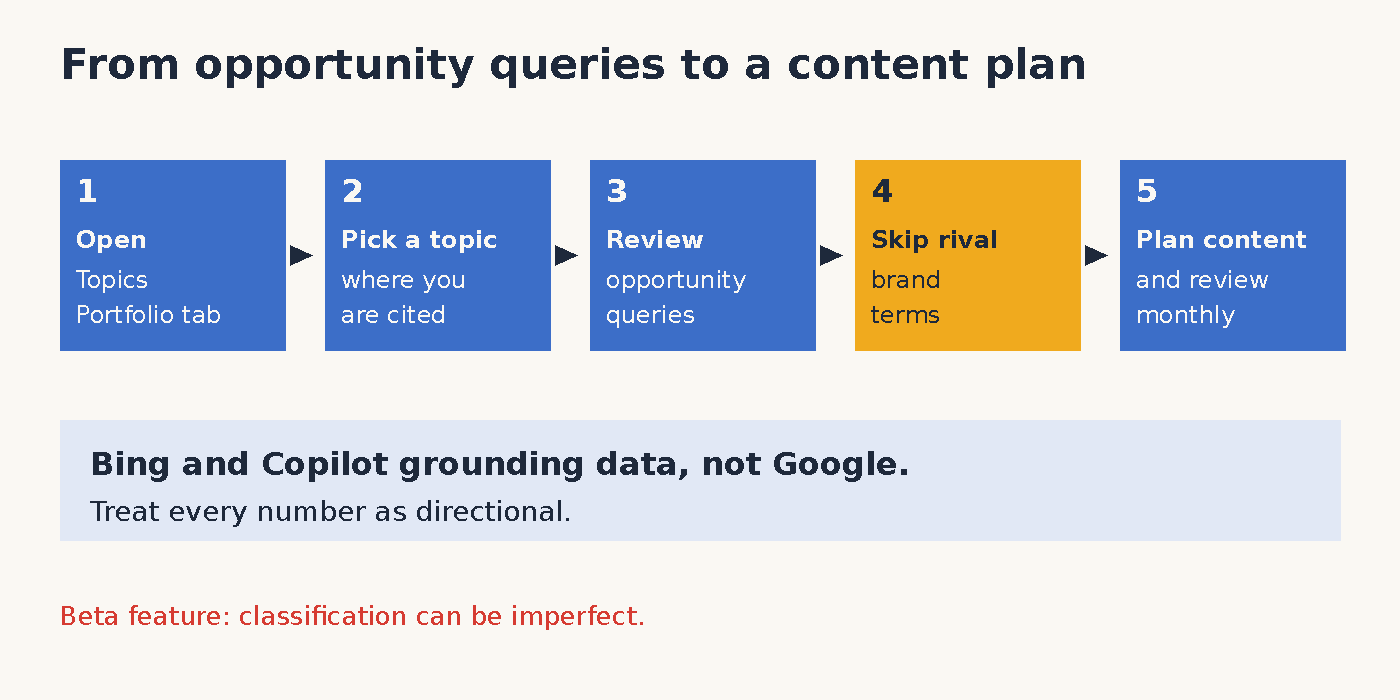
To find it, open AI Performance for your site. If your site has enough data, a Topics Portfolio tab appears next to Citations & Pages. Smaller sites may not see it yet. The announcement post has the full details.
These Bing AI Performance topic clusters answer a different question than the query list. Instead of asking which phrase triggered a citation, you ask which themes your site is known for. That is closer to how I plan editorial calendars for clients.
How to read each column in Bing Topics Portfolio
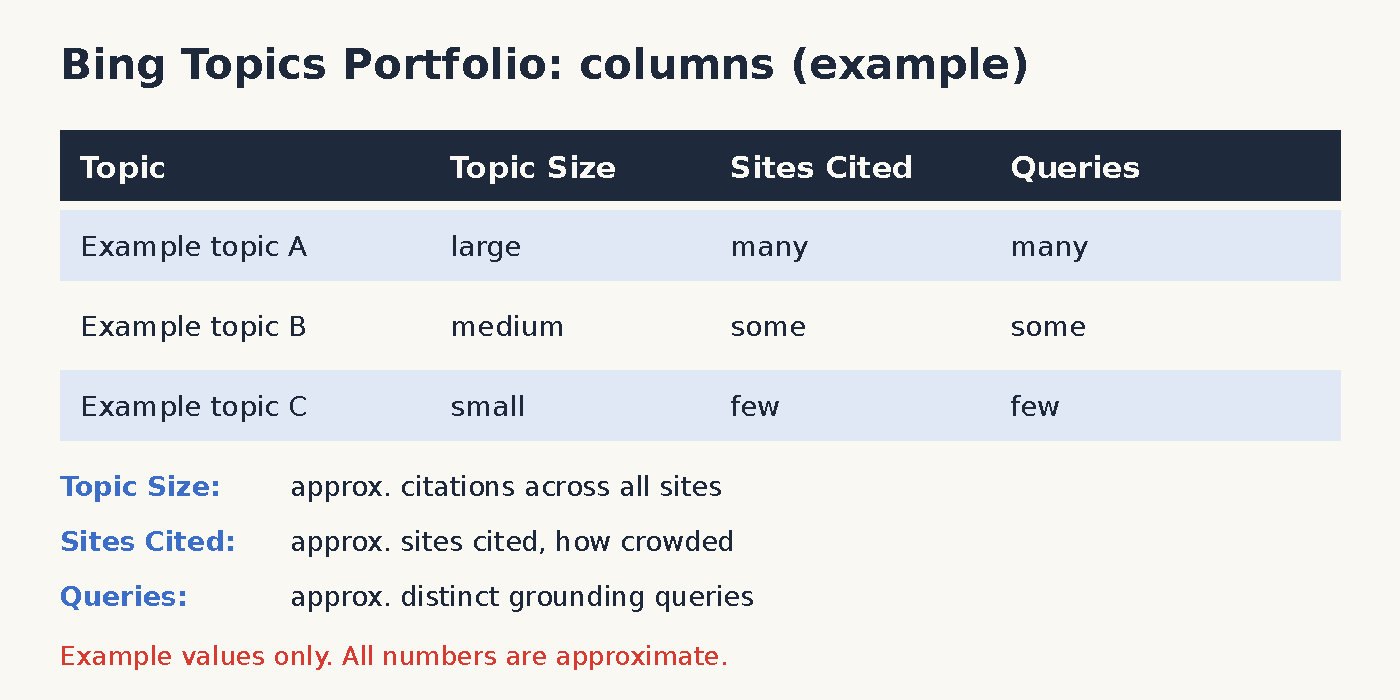
The landing page lists topics where your site has a meaningful presence. Each row has three measures beside it, and all of them are approximate.
- Topic: a broad cluster of related grounding queries where your site appears.
- Topic Size: the approximate total citations across all sites for that topic in the selected period. In plain terms, it shows how much AI search demand the topic represents.
- Sites Cited: the approximate number of sites that appear for queries in the topic. A higher number means a more crowded topic.
- Queries: the approximate number of distinct grounding queries in the topic.
You can pick a one, two or three month window. I start with three months, because short windows can look noisy.
Opportunity queries and topic pages
Below the table sits a Top Opportunity Queries list. It shows the strongest queries across your portfolio where other sites are cited and yours is not. Citation volumes there appear as ranges, not exact numbers.
Click any topic to open its detail page. Three cards show the Topic Size, your own citations and the number of queries. Below them, Your Grounding Queries lists what you already own, while Opportunity Queries lists what is still open.
What I would actually do with it
Start where your citations are already concentrated, as Microsoft suggests. Then work down the opportunity queries and decide which ones fit your business.
- Plan content: turn relevant opportunity queries into new pages or into sections on existing pages.
- Ignore competitor brand terms: Microsoft warns that branded queries can show up as opportunities. A rival’s product name is not a topic for you.
- Check the fit: classification is AI-generated, so a query may sit in a topic you would label differently.
- Stay directional: Microsoft calls the numbers directional signals for planning, not a precise ledger.
Moreover, crowded topics are not automatically bad. A topic with many sites cited and a large size shows real demand, but it also asks for stronger content. A smaller topic with few sites may be an easier first step.
What it does not tell you
The report does not show Google rankings or Google AI Overviews. It also does not tell you why a competitor was cited, and it does not prove that new content will win a citation. Microsoft also notes that smaller sites may see a short list or nothing at all.
Citations also do not equal traffic. If you are still deciding whether AI visibility deserves your time, my view on whether SEO is dead and my State of AI roundup for October 2026 give the wider picture. Likewise, my llms.txt evidence check shows why I rely on measured data over hype.
Basic hygiene still comes first. If crawl problems block your pages, no topic report will help, so I fix those with a Search Console crawl error clean-up before anything else.
Feedback and my take
Every topic row and every opportunity query has a thumbs up and thumbs down control. Microsoft says those signals go to the team that works on the classification, so I mark rows that miss the mark. It is a small effort that improves the beta.
I would also revisit the report monthly rather than daily. Topic lists move slowly, and a monthly rhythm fits a normal content plan. Meanwhile, keep notes on which opportunity queries you acted on, so you can compare later.
My take is simple. Use Topics Portfolio to plan content, and keep it in proportion. It is useful, early and clearly labelled as beta.
Sources
- Introducing Topics Portfolio (Beta) in AI Performance, Bing Webmaster Blog, Microsoft, October 13, 2026: blogs.bing.com
- Introducing AI Performance in Bing Webmaster Tools Public Preview, Bing Webmaster Blog, Microsoft, February 10, 2026: blogs.bing.com
- New AI Visibility Insights in Bing Webmaster Tools, Bing Webmaster Blog, Microsoft, June 16, 2026: blogs.bing.com