
If your site is not huge, and it does not change every day, crawl budget is probably not your problem. Skip that guide if you do not have a large set of pages that change fast. Also skip it if Google fetches new pages on the day you publish them. For Google Search, a current sitemap and a regular look at the Page Indexing report is enough.
That “same day” line is easy to misread. It is a reason to stop worrying, not a target. Most sites should not expect same-day crawling. New pages often take several days before Google notices them. Checking and indexing often takes three days or more. News sites, and other time-sensitive sites, are the exception. So a normal business site that shows up a few days later is not failing a crawl-budget test.
What Google means by crawl budget
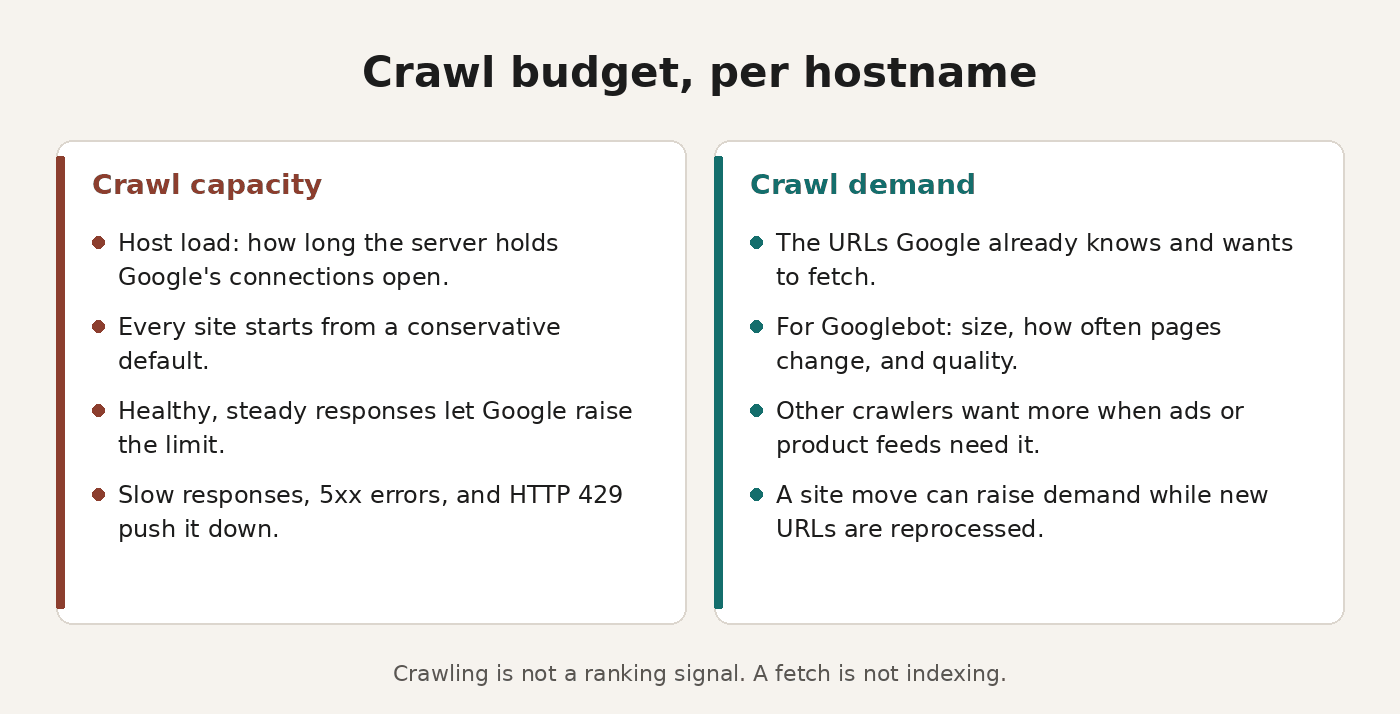
For crawling, Google treats one hostname as the site. A www host and a code host on the same parent domain each have a separate budget. The budget is the set of URLs Google can fetch and wants to fetch. It is not a ranking signal. A fetch does not index the URL, and a 200 does not prove the body was usable. I wrote about that in why a page can look fine and still be invisible to Googlebot. After the crawl, Google still evaluates the page, consolidates duplicates, and judges it.
Crawl capacity
Crawl capacity limit, also called host load, caps how long your server holds connections open for Google. Every site starts from the same conservative default. If Google wants to fetch more and the site stays healthy, Google raises the limit. Consistent responses push it up. So does latency that holds or improves, including time to first byte. Slow responses, 5xx errors, or HTTP 429 push it down.
Crawl demand
Crawl demand is separate, and Google sets it per crawler. AdsBot wants more when a site runs dynamic ad targets. Google Shopping wants more for products in a merchant feed. For Googlebot, demand depends on size, update frequency, page quality, and relevance next to other sites. You influence perceived inventory most: URLs Google already knows and will try to fetch.
Duplicates, removed URLs, and unimportant URLs burn that time. Google recrawls popular URLs to keep them fresh. It also recrawls stale documents so real changes get picked up. A site move can raise demand while Google reprocesses the new URLs.
Crawlers share that capacity
Crawlers share that capacity, so heavy demand from one leaves less for the others. Low demand means less fetching, even under the ceiling. How you produce the HTML changes what Google has to fetch. I compared the tradeoffs in server rendering, static generation, and client-side rendering.
What a normal site should pay attention to
Who should use the guide
The optimization guide covers a narrow group. One group is large sites, about a million unique pages or more, that change at a moderate pace, about weekly. Another is medium or larger sites, about 10,000 unique pages or more, that change daily. A third has many known URLs in Search Console under Discovered, currently not indexed. Those figures are a rough guide, not exact cutoffs.
If the guide does not describe your site, do not open a crawl budget project.
Sitemap and lastmod
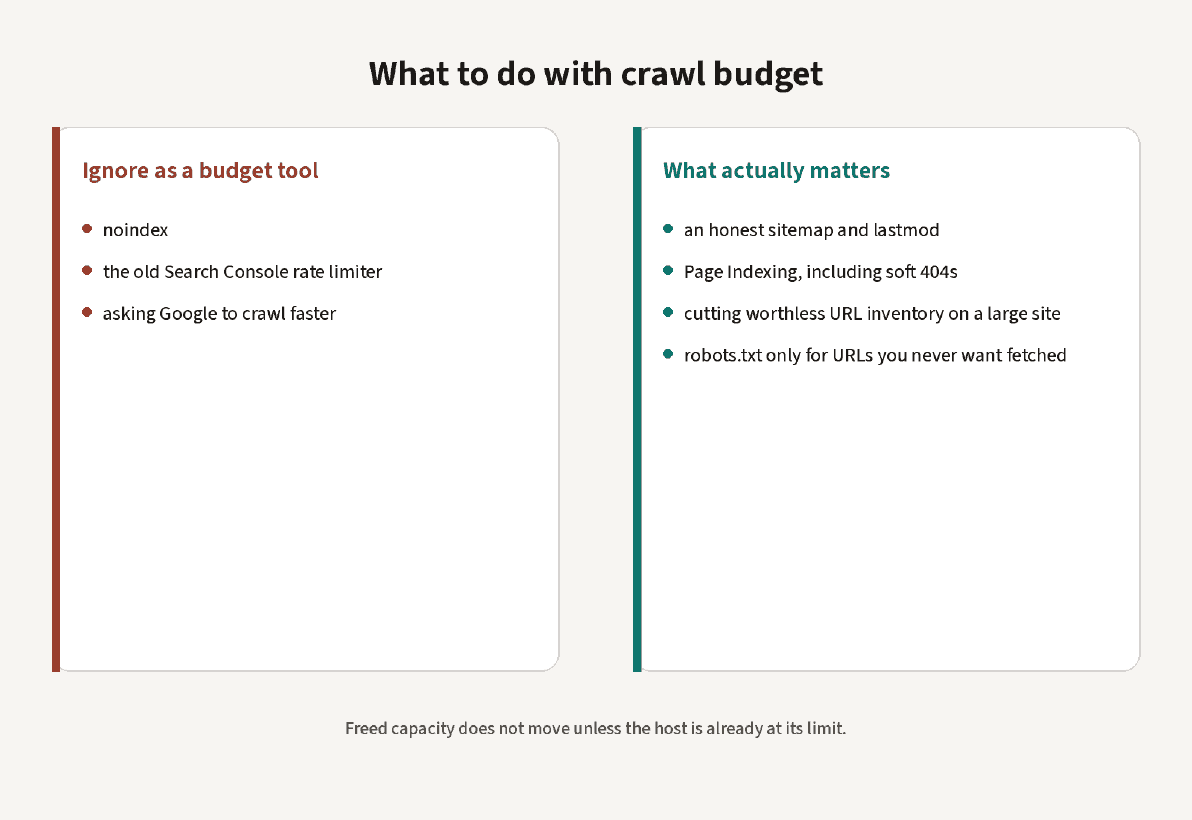
Keep the sitemap current, with only the URLs you want fetched. Set lastmod when the content actually changes. Do not tweak a sentence and then bump the date. For Google Search, useful content stays useful whether it is old or new. Also, do not resubmit the same unchanged sitemap several times a day. A sitemap is a suggestion, not a queue. It should not list URLs you do not want in Search.
Page Indexing and soft 404s
Use the Page Indexing report to catch a real mess, not as a daily ritual. The pattern that wastes fetches is the soft 404, a missing or empty page that still returns 200. Other 4xx responses, aside from 429, do not waste budget in that sense. Google got a status and no body. A 404 is a strong signal to stay away. You do not need a robots.txt rule to retire a deleted URL. A 403 or a robots.txt block is a different problem. I wrote up the usual cases in fixing crawl blocks in Search Console.
Tricks that do not save a fetch
Do not add noindex to save a fetch. Google has to request the URL to see the tag, and then drops the page. Use noindex when you want the URL out of the index, not as a budget trick. Crawl rate is not a ranking signal.
The old Search Console crawl rate limiter is not a knob you should turn. In November 2023, Google set 8 January 2024 as the shutdown date. Automated rate handling had made the tool rarely useful. The current page on reducing the crawl rate does not offer that setting. A normal site should not try to slow Google down.
What a large site should pay attention to
Inventory is the lever
If you are in the group the guide describes, inventory is the lever. When Google spends fetches on URLs you do not want fetched, it may never reach the rest of the host. The budget may not grow.
The troubleshooting doc lists the usual waste. Faceted navigation and session identifiers are on it. So are sort and filter parameters, duplicates, soft 404s, infinite spaces, proxies, and hacked or spam URLs. Shopping carts are too, along with infinite scroll that repeats a page, and URLs that only perform an action.
Consolidate, or block for good
Where two URLs say the same thing, consolidate them. Where you never want a URL fetched, block it in robots.txt. A block stops the request, so further work, including indexing, becomes much less likely. Do not use robots.txt as a temporary shuffle. Google will not move the freed capacity onto other pages unless the host is already at its serving limit. A noindex tag does not skip the fetch.
Status codes for a page that left
When a page is no longer there, return 404 or 410. Google does not forget a known URL, but a 404 is a strong reason to stay away. A URL you only block stays in the fetch queue much longer. Google fetches it again once the block comes off. Soft 404s need a real status, not a friendly error on a 200. You will find them in the Page Indexing report.
Keep the server predictable
Avoid long redirect chains, and keep response times stable. Support 304 Not Modified when nothing has changed. Google sometimes sends If-Modified-Since or If-None-Match, though not on every request. You can still answer 304 with an empty body. Fetched hreflang URLs count, and so do old AMP URLs, embedded CSS, JavaScript, and XHR calls. The crawl-delay line in robots.txt does nothing, because Google does not process it.
Where to look
Watch server errors and availability in the Crawl Stats report. Host availability graphs mark where requests from Googlebot cross the limit line, with example URLs behind that point.
Search Console will not give you a fetch log filtered by path. For one URL, use server logs or URL Inspection. To see which bots requested a URL, I use CrawlerCheck, the bot checker I built.
URL Inspection shows the Hostload exceeded note. Googlebot cannot fetch as many URLs as it discovered, because the server cannot serve them. Adding servers is one way to raise the budget, and only if you need the extra fetches. The other way is quality for the product you care about. For Search, that means popularity, user value, uniqueness, and a server that can serve the page.
Spikes, errors, and when to stop
A spike on a shared host usually comes from faceted URLs, a calendar, or dynamic ad targets, not from Googlebot alone. Returning 503, 429, or 500 slows the whole hostname. If you hold 503 or 429 for more than two days, Google can drop those URLs from the index. That is an outage measure, not a way to free budget.
If the host is healthy, and the sitemap lists the URLs you want, stop. Also stop once filter URLs and session URLs are out of the queue. Stop too once new pages show up within a few days. More fetching is not the goal. Spend the fetches you already get on URLs that should be eligible for the index.
Sources
- Optimize your crawl budget. The older Search Central URL redirects here.
- Troubleshoot Google Search crawling errors.
- Myths and facts about crawling.
- Reduce the Google crawl rate.
- Deprecation of the Search Console crawl rate limiter.
- Crawl Stats report.
One comment on “Crawl budget: what to ignore, and what actually matters”