
For years I kept WordPress and Shopify in two separate boxes. WordPress was where content lived, while Shopify was where serious stores lived. Now Shopify on WordPress is an official, Shopify built setup, and that changes the talks I have with clients.
So the question is no longer just WooCommerce or Shopify. Instead, it is which of three setups fits your business. Below, I share what Shopify really offers today. I also correct a WordPress number you often hear and give my honest verdict.
What Shopify offers for WordPress today
The headline item is the official Shopify plugin for WordPress. It works together with a free sales channel called Sell on WordPress. According to the Shopify App Store, that channel launched on 15 September 2025. Later, Shopify also featured it in its Winter ’26 Edition.
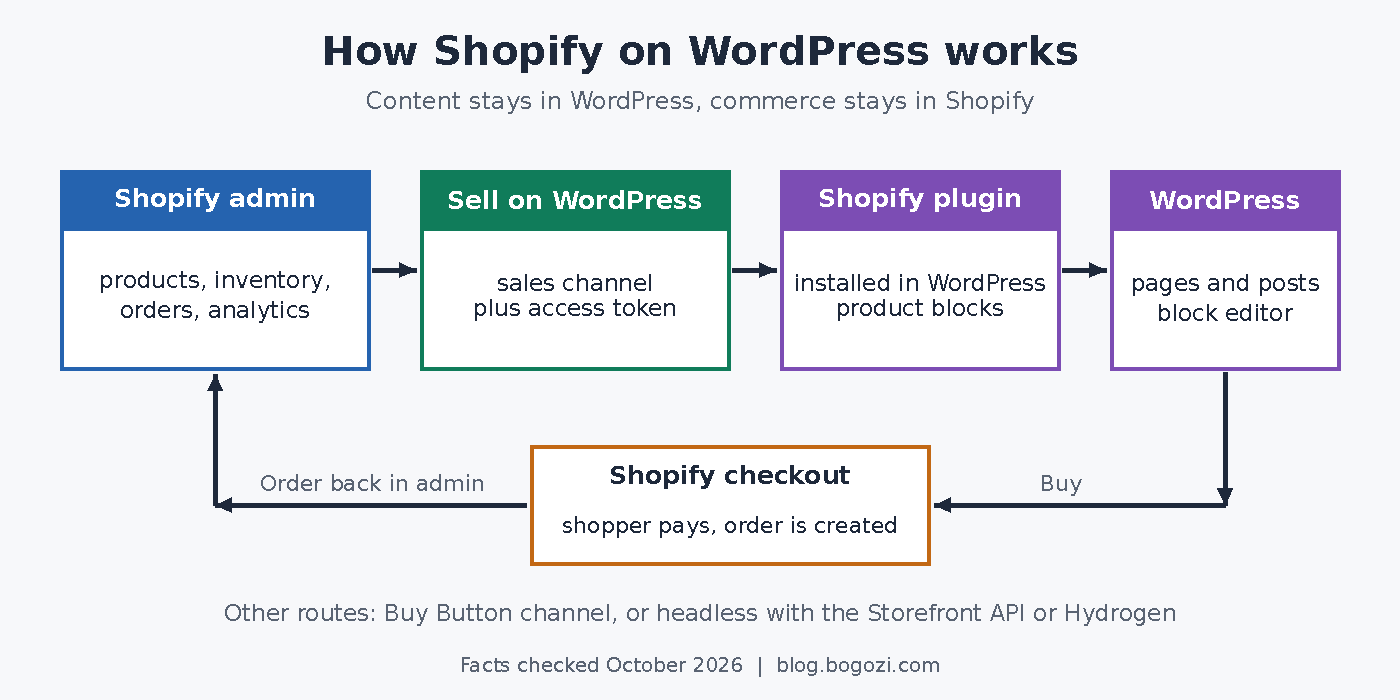
In short, you manage products in Shopify and then drop them into WordPress pages with blocks. Here is what I found in the primary sources on 8 October 2026:
- The plugin is free and built by Shopify. Its readme shows version 1.0.0, which tells me it is still young.
- It needs WordPress 5.0 and PHP 7.4. Also, the readme says it was tested up to WordPress 6.8.
- You must use the block editor, because Shopify’s Help Center says it does not support the Classic Editor.
- Shopify officially supports the default block themes, from Twenty Twenty-Three to Twenty Twenty-Five.
- Products appear through Storefront Web Components: product cards, a quick view, product pages and collections.
- Checkout, orders, inventory and analytics all stay in your Shopify admin.
One detail surprised me. Shopify’s developer docs point to a wordpress.org listing, yet that listing did not exist when I checked. Instead, you download a zip file from Shopify’s own CDN. I also found no built in updater in that zip, so plan to update it by hand for now.
The older routes and the headless option
Besides the plugin, two other routes still exist. First, the Buy Button channel lets you embed products on any non Shopify site. Shoppers can buy without leaving your page, and price changes in Shopify show up on the button. Still, I see it as a tool for a few products, not a full catalog.
Second, Shopify offers headless commerce for custom builds. Hydrogen is its official framework, built on React Router, with free hosting on Oxygen. Alternatively, your own stack, WordPress included, can pull data from the Storefront API. If headless is new to you, my guide to headless CMS covers the basics.
WordPress is big, but not 70% big
You often hear that almost 70% of websites run WordPress. That figure is wrong. According to W3Techs, WordPress powers 40.1% of all websites in October 2026. Among sites with a known CMS, its share is 58.6%.
That is still huge, of course. W3Techs also reports WooCommerce on 19.8% of WordPress sites. In other words, many WordPress owners already sell with WooCommerce. Clearly, that is the audience Shopify hopes to win with this plugin.
WooCommerce vs Shopify vs Shopify on WordPress
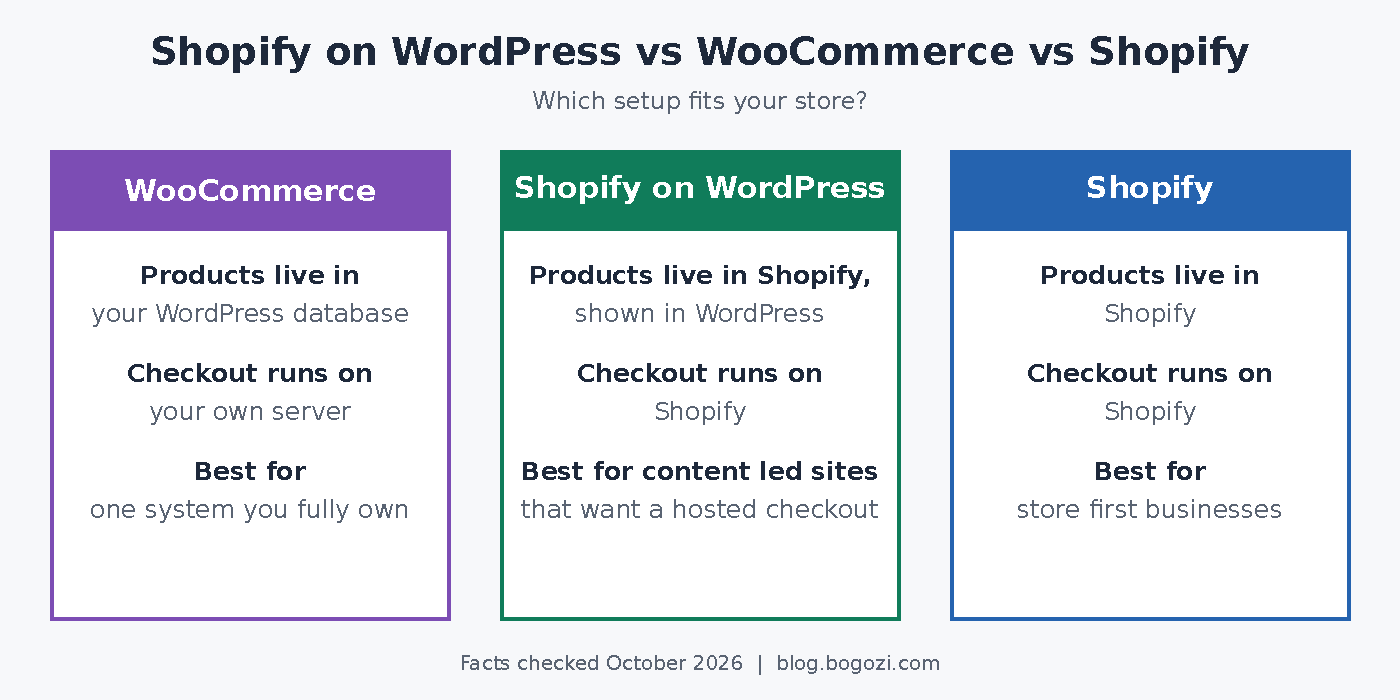
Before the verdict, here is how I compare the three setups in client projects. If you want the wider picture, I also wrote a comparison of the best CMS for ecommerce.
| WooCommerce | Shopify | Shopify on WordPress | |
|---|---|---|---|
| Products live in | WordPress database | Shopify | Shopify, shown in WordPress |
| Checkout | WooCommerce on your server | Shopify checkout | Shopify checkout |
| Hosting and upkeep | You host and maintain everything | Shopify hosts the store | You host WordPress, Shopify runs commerce |
| Design control | Full control in WordPress | Shopify themes | WordPress design, block themes preferred |
| Best fit | One system, full ownership | Store first businesses | Content led brands that want a hosted checkout |
The main trade off is where your data lives. With WooCommerce, everything sits on your own server. With Shopify, the store lives on Shopify. Meanwhile, the hybrid setup splits the two, so content stays in WordPress and commerce stays in Shopify.
Of course, Shopify markets its checkout hard. Its readme claims conversion up to 17% higher than WooCommerce, based on its own April 2023 study. I treat that as a vendor claim, not a neutral benchmark.
My verdict: which setup makes sense when
There is no single winner here. Rather, the right choice depends on your catalog, your team and where your traffic comes from. This is how I advise clients today.
Small catalog on a content led site
If you sell a few products next to strong content, start simple. WooCommerce works well, and so does the Buy Button. However, when a client already pays for Shopify, the plugin is now my first suggestion. Think of a blogger with ten products, not a shop with ten thousand.
Growing store that wants a hosted checkout
Here the hybrid setup makes the most sense to me. You keep the WordPress site that already ranks, and you hand payments, orders and shipping to Shopify. As a result, you run fewer commerce plugins on your server.
Still, test everything on a staging copy first. After all, version 1.0.0 is an early release. Also, its App Store rating was 1.7 from four reviews when I checked. Keep in mind that your hosting choice for a small business site still matters, since WordPress stays on your server.
Larger or custom builds
For a large catalog, I usually go all in on one platform. Either run Shopify as the main store, or build a serious WooCommerce setup on solid hosting. Splitting a big catalog across two systems raises sync and SEO questions.
Moreover, product pages rendered by web components need care for SEO. In fact, Shopify’s own docs suggest server side rendering through the Storefront API for better SEO. That means extra development work, so budget for it early.
Headless projects
If you need full freedom, go headless. Hydrogen with Oxygen is Shopify’s official path. Alternatively, WordPress can stay your content source while a custom front end pulls products from the Storefront API. Because this costs more to build, I only recommend it with the right budget and team.
So, game changer or not?
For content led businesses, I would say yes, with a caveat. Shopify on WordPress finally gives you an official bridge between great content and a hosted checkout. For everyone else, it is one more good option rather than a revolution.
My advice is simple. First decide where your products should live, then choose the setup. If you are still shaping that plan, start with my notes on building an ecommerce strategy.
Sources
- Sell on WordPress with Shopify, Shopify, checked 8 October 2026
- Sell on WordPress sales channel, Shopify App Store, launched 15 September 2025
- Shopify Editions Winter ’26, Shopify
- Sell on WordPress, Shopify Help Center, checked 8 October 2026
- Shopify Plugin for WordPress, Shopify.dev, checked 8 October 2026
- Customize theme components, Shopify.dev, checked 8 October 2026
- Buy Button, Shopify Help Center, checked 8 October 2026
- Build headless commerce, Shopify.dev, checked 8 October 2026
- Usage Statistics and Market Share of WordPress, October 2026, W3Techs, October 2026


One comment on “Shopify on WordPress: game changer or not?”